
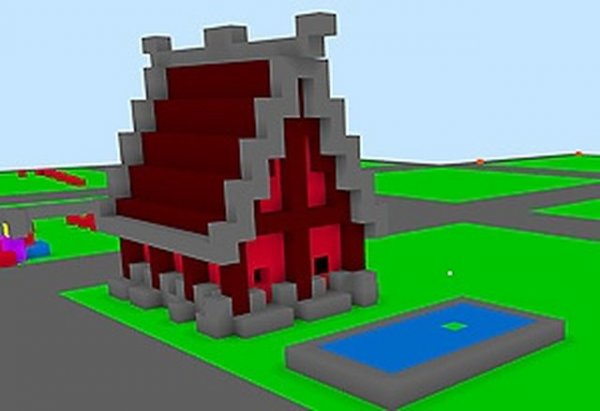
Citycraft Builder: Creative Sandbox
Reviews
About this game
Game Introduction
Citycraft Builder is a creative sandbox game where players build structures using colorful blocks in a virtual world. The game is inspired by the popular building genre and allows you to choose the color of each block to create whatever you imagine. Everything you see in this world has been built by other players, making it a community-driven space for creativity. The game runs directly in your browser with no download required, making it easy to start playing instantly. It offers a simple entry point for newcomers while providing enough depth to keep both casual and dedicated players engaged. As you progress, you will encounter new situations and challenges that encourage you to return for more sessions. The pacing balances relaxation with fun, inviting you to explore all the game has to offer. Whether you have a few minutes or a longer period, Citycraft Builder adapts to your schedule. The focus is on free expression and building without limits, letting your imagination guide your creations.
How to Play
To play Citycraft Builder, use your keyboard and mouse to move around the virtual world and place blocks. At the start, review the controls shown on screen to understand how to select block colors and position your builds. The main goal is to create structures by placing blocks one at a time, using your creativity to design houses, landscapes, or abstract art. You can also explore areas built by others for inspiration. The game supports short sessions where you can add a few blocks or longer playtimes for larger projects. Practice basic movement and block placement in the early stages to become comfortable with the controls. There is no set objective other than to build and enjoy the process.
Game Features
Citycraft Builder includes clear progression with objectives that gradually become more demanding, keeping the experience fresh. The game is optimized for both desktop and mobile browsers, allowing you to play on different devices. Different phases and scenarios maintain interest over multiple sessions. Customization options let you adapt the experience to your style, such as choosing block colors. A reward system encourages completing objectives and breaking your own records. The game offers a variety of modes and scenarios typical of the building genre, with intuitive controls suited for fast browser-based play. Strong replay value comes from changing environments and the ability to start new projects anytime.
Tips for Success
Observe the environment before you act; many building projects benefit from planning. Learn from each attempt and adjust your approach on the next try. Focus on primary objectives before chasing optional rewards. Stay calm when facing larger builds; rushing can lead to mistakes. Use early stages to master controls and block placement without pressure. In building games, combining basic movement with smart choices helps you create more impressive structures.
Leave a Comment